Examplary renders React components for each question type in various contexts.
You can implement components for the following views:
assessment: The main view where users interact with the question, either by the student during the assessment, or by the teacher in the question editor preview window.print: A simplified view for printing the question, which is used in the print preview and when printing the assessment.results: Displaying the results of the question, both in the teacher's review of the assessment and when a student reviews their own results — so don't show anything here that students shouldn't see.settings-area: Displaying custom settings for the question type in the question editor.
Only use the settings-area component if you need to display custom settings for your question type that can't be covered using the standard settings described in the metadata section.
Building and testing components
Components should be implemented as React components in JavaScript or TypeScript. You can use any React features, including hooks, context, and state management.
Here's a simple example of the assessment component in the single-line-text question type, written in JavaScript:
import { RichTextField } from "@examplary/ui";

export default ({ answer, saveAnswer, t }) => {
  return (
    <RichTextField
      singleLine
      value={answer?.value || ""}
      placeholder={t("placeholder")}
      onChange={(value) => {
        const valid = value.trim().length > 0;
        saveAnswer({ value, completed: valid });
      }}
    />
  );
};
To aid in typing, you can write the same thing in TypeScript:
import { FrontendAssessmentComponent, RichTextField } from "@examplary/ui";

const AssessmentComponent: FrontendAssessmentComponent = ({
  answer,
  saveAnswer,
  t,
}) => {
  return (
    <RichTextField
      singleLine
      value={(answer?.value as string) || ""}
      placeholder={t("placeholder")}
      onChange={(value) => {
        const valid = value.trim().length > 0;
        saveAnswer({ value, completed: valid });
      }}
    />
  );
};

export default AssessmentComponent;
Testing locally
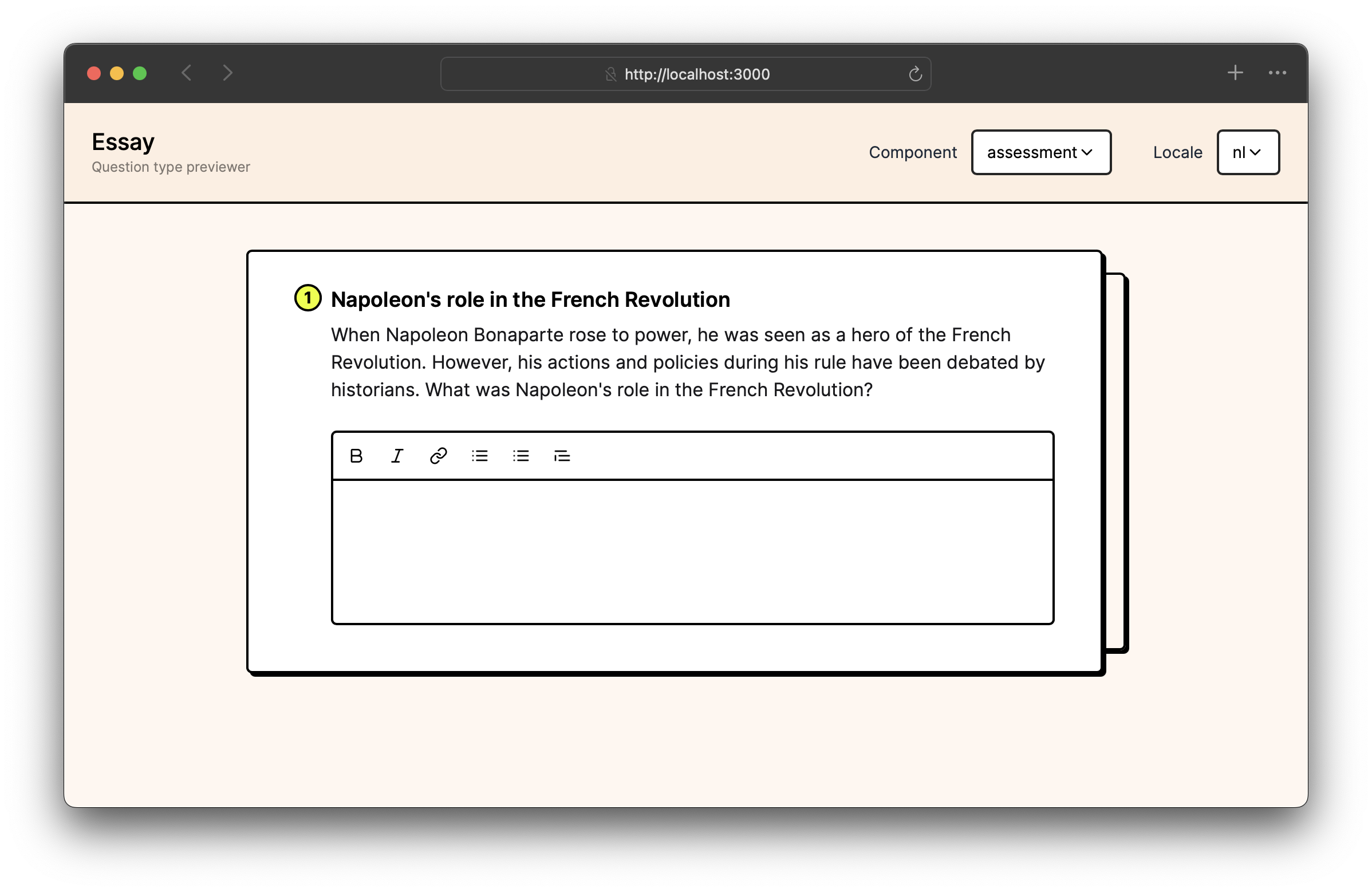
In your question type folder, you can use the Examplary CLI to preview your question type locally. Make sure a recent version of Node and NPM are installed, then run:
npx @examplary/cli previewThis will start a local server that serves your question type, allowing you to test it in various scenarios. The preview tool will automatically reload when you make changes to your components, so you can see the results immediately.
Object types
Question object
This represents the question itself, which is passed to the components as a prop. It contains metadata about the question type, such as its name, description, and settings.
It looks like this:
{
  "id": "q_qQjXQasmUfpWRV5KO5mzkxoy",
  "title": "Napoleon's role in the French Revolution",
  "type": "single-line-text",
  "description": "When Napoleon Bonaparte rose to power, he was seen as a hero of the French Revolution. However, his actions and policies during his rule have been debated by historians. What was Napoleon's role in the French Revolution?",
  "settings": {
    "hintEnabled": true,
    "wordLimit": 200
  },
  "scoring": {
    "rubricType": "analytical",
    "criteria": [{ "id": "c1", "title": "Correctness", "levels": [{ "id": "c1l1", "title": "Correct", "points": 1 }] }]
  },
  "externalId": "my_question_1",
  "metadata": { "my_service_internal_id": "abc1234" }
}
The settings field contains your question type's own settings, as defined in question-type.json. During an actual exam session, any setting literally named correctAnswer is always stripped from this object before it reaches the assessment component, regardless of question type — avoid that name if you need the value available while a student is taking the exam.
The scoring field holds the rubric configuration set by the teacher. It is available to the results component so you can display how the question was scored.
The metadata field is a key-value store for external system data — values must be strings, numbers, booleans, or null; nested objects and arrays are rejected. It is passed through unchanged to print, results, and settings-area components, and to the assessment component in the question editor preview. During an actual exam session, the assessment component instead receives a reduced object: only id, type, title, description, and settings (with correctAnswer removed) are included, plus pointsToEarn and canProvideFeedback when the exam is configured to show them.
Answer object
The answer object represents the student's answer to the question. It contains the following properties:
{
  "value": "He was important because he was a general in the French army and later became the Emperor of France.",
  "completed": true,
  "context": {}
}
The value property contains the student's answer, which can be a string or an array of strings — array items can also be null, which is used to represent an empty slot in a partially-filled ordering or matching answer. The completed property indicates whether the answer is complete, and the context property can hold additional information relevant to the answer. The question type can define what this context should contain, but it is not required.
Component props
Assessment component props
| Prop | Type | Description |
|---|---|---|
question | Question | The question object, which contains metadata about the question type, such as its title and settings. |
answer | Answer | The current answer object, which may contain the student's answer and its completion status. |
saveAnswer | function | A function to save the answer. It takes an object with value, completed and context properties. |
isPreview | boolean | Indicates whether the component is being rendered in a preview context (e.g., in the question editor). |
isLoading | boolean | Indicates whether the question is currently loading (e.g., during AI content generation). |
reviewMode | boolean (optional) | When true, the component is rendered in review mode where the student can see but not modify their answer. |
environment | "exam" | "practice-space" | The context in which the component is rendered. |
api | API object | An API client instance for making requests to the Examplary REST API, including file uploads and AI generation. |
t | Translation function | A function to access translations defined in question-type.json. |
i18n | object | The i18next instance, providing full access to the i18n API (use t for simple translations). |
Print component props
| Prop | Type | Description |
|---|---|---|
question | Question | The question object, which contains metadata about the question type, such as its title and settings. |
answerBoxes | boolean | Whether to show boxes for the student to write their answers down. |
environment | "exam" | "practice-space" | The context in which the component is rendered. |
api | API object | An API client instance for making requests to the Examplary REST API, including file uploads. |
t | Translation function | A function to access translations defined in question-type.json. |
i18n | object | The i18next instance, providing full access to the i18n API (use t for simple translations). |
Results component props
| Prop | Type | Description |
|---|---|---|
question | Question | The question object, which contains metadata about the question type, such as its title and settings. |
answer | Answer | The current answer object, which may contain the student's answer and its completion status. |
environment | "exam" | "practice-space" | The context in which the component is rendered. |
api | API object | An API client instance for making requests to the Examplary REST API, including file uploads. |
t | Translation function | A function to access translations defined in question-type.json. |
i18n | object | The i18next instance, providing full access to the i18n API (use t for simple translations). |
Settings area component props
| Prop | Type | Description |
|---|---|---|
question | Question | The question object, which contains metadata about the question type, such as its title and settings. |
settings | object | The current settings for the question type, which can be modified by the user. |
setSetting | function | A function to update a specific setting. It takes the setting ID and the new value as arguments. |
setMultipleSettings | function | A function to update multiple settings at once. It takes an object with setting IDs as keys and their new values as values. |
environment | "exam" | "practice-space" | The context in which the component is rendered. |
api | API object | An API client instance for making requests to the Examplary REST API and uploading files. |
t | Translation function | A function to access translations defined in question-type.json. |
i18n | object | The i18next instance, providing full access to the i18n API (use t for simple translations). |